Services · Microsoft 365

Microsoft 365 security review and configuration, verified in your tenant.

LensIQ reads what your Microsoft 365 tenant enforces today across Microsoft Entra ID, Intune, Defender and Exchange Online, configures the gaps, then reads again to show each change took effect. Every result links to the setting behind it.

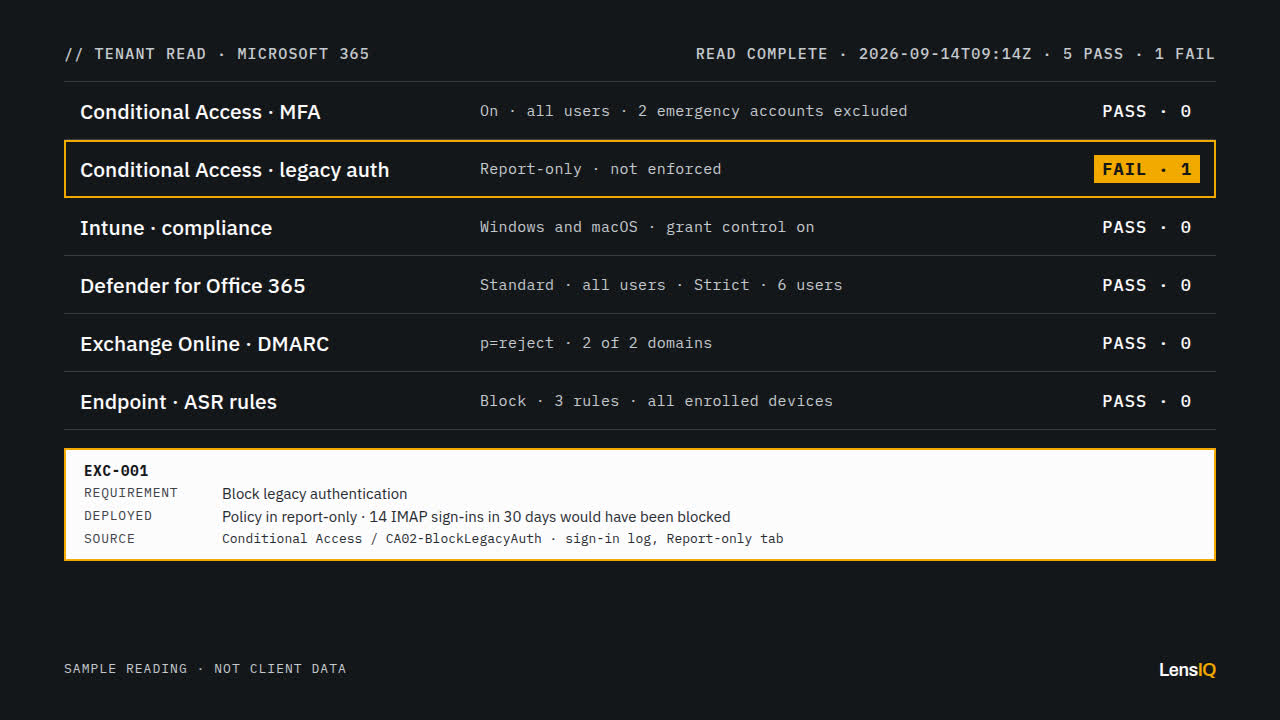
Sample tenant reading of six Microsoft 365 controls. Five read PASS. Block legacy authentication reads FAIL, 1 exception, because the policy is still in report-only, and exception EXC-001 is logged with its sign-in log source.
A sample reading of six controls. Legacy authentication is still in report-only. Sample data.

01 · Defaults

Default settings are not a configuration.

A licence switches a feature on for purchase, not for users. These four gaps show up in tenants that hold the right licences.

02 · Method

Read, configure, verify. In that order.

  1. 01

    Map

    Each control is mapped to the requirement it serves, such as your information security policy, a cyber insurance questionnaire, or a board commitment to MFA for every account.

  2. 02

    Read

    Configuration is read from the tenant with read-only roles: Global Reader across the admin centres, plus Security Reader for Secure Score, which Global Reader cannot see. The reading covers Conditional Access policies and sign-in logs, Intune compliance, Defender policies, and the SPF, DKIM and DMARC records for your domains. Design documents are not used as evidence.

  3. 03

    Configure

    Changes are built in your production tenant, alongside your team, and each starts in a test state. Each moves to enforcement once its results are reviewed.

    • Conditional Access Report-only to On
    • ASR rules Audit to Block
    • DMARC p=none to p=reject
  4. 04

    Verify

    The tenant is read again and each control is tested against its requirement. Every exception is listed individually, with the policy and the sign-in or configuration record behind it.

03 · Evidence

A tenant reading.

Every control is read from the tenant and tested against the requirement it exists to meet. Exceptions are logged with their source record.

Sample reading · not client data

Read complete · 2026-09-14T09:14Z

  1. Conditional Access · MFA

    Requirement
    Require MFA for all users
    Deployed
    On · all users · 2 emergency accounts excluded
    Result
    PASS, 0 exceptions
  2. Conditional Access · legacy auth

    Requirement
    Block legacy authentication
    Deployed
    Report-only · not enforced
    Result
    FAIL, 1 exception
  3. Intune · compliance

    Requirement
    Require a compliant device for Exchange, SharePoint and Teams
    Deployed
    Compliance policies on Windows and macOS · grant control on
    Result
    PASS, 0 exceptions
  4. Defender for Office 365

    Requirement
    Standard preset for all users, Strict for executives
    Deployed
    Standard · all users · Strict · 6 users
    Result
    PASS, 0 exceptions
  5. Exchange Online · DMARC

    Requirement
    p=reject on every sending domain
    Deployed
    p=reject · 2 of 2 domains
    Result
    PASS, 0 exceptions
  6. Endpoint · ASR rules

    Requirement
    Standard protection rules in Block
    Deployed
    Block · 3 rules · all enrolled devices
    Result
    PASS, 0 exceptions
Each result is traceable to its source record. Six controls read from a sample tenant; one exception.

04 · Scope

What LensIQ configures in Microsoft 365.

Microsoft 365 service areas LensIQ configures Six service areas connected to your tenant: Identity (Microsoft Entra ID); Devices (Microsoft Intune and Windows Autopilot); Email and collaboration (Exchange Online, Defender for Office 365, SharePoint, OneDrive and Teams); Endpoint (Microsoft Defender for Endpoint and Defender for Business); Copilot readiness (Microsoft 365 Copilot); Tenant setup, migration and licensing (Microsoft 365 tenant and subscriptions). Your tenant Identity Devices Email · collaboration Endpoint Copilot readiness Tenant · licences

Six areas, each delivered as a configuration, the rationale behind it and the evidence it is enforced. Scope is agreed first, so an engagement can cover one area or all six.

Microsoft Entra ID

Identity

Conditional Access. A policy set that requires MFA for every user, blocks legacy authentication and requires a compliant device where your requirement calls for one. Each policy runs in report-only first and the sign-in results are kept as evidence.

Emergency access. Two cloud-only emergency accounts, excluded from Conditional Access so a policy error cannot lock out every administrator, and registered with passkeys to meet Microsoft's mandatory MFA for admin portals.

Security defaults or Conditional Access. Tenants without Entra ID P1 keep security defaults; tenants with P1 move to Conditional Access. The decision is written down with the licence behind it.

Output Conditional Access policy set with named exclusions · report-only results · emergency access runbook

Microsoft Intune and Windows Autopilot

Devices

Compliance. Compliance policies for Windows, macOS, iOS and Android, reported to Entra ID and used by Conditional Access to grant or block access to email and files.

Autopilot. A new Windows device ships to the user, joins Entra ID, enrols in Intune, receives BitLocker and Windows Hello for Business, and is checked for compliance before the desktop appears.

Personal devices. App protection policies that keep work data inside managed apps on phones the organisation does not own.

Output Compliance policies per platform · configuration profiles · Autopilot deployment profile · app protection policies

Exchange Online, Defender for Office 365, SharePoint, OneDrive and Teams

Email and collaboration

Threat policies. Standard and Strict preset security policies assigned by group, with impersonation protection for the people most likely to be spoofed.

Email authentication. SPF and DKIM for every sending domain, then DMARC stepped from p=none through p=quarantine to p=reject, with the aggregate reports reviewed at each step.

Sharing. SharePoint and OneDrive sharing moved off their most permissive default, and Teams external and guest access set to match who you actually collaborate with.

Output Threat policy assignments · DNS records for SPF, DKIM and DMARC · sharing and external access settings with rationale

Microsoft Defender for Endpoint and Defender for Business

Endpoint

Onboarding. Devices onboarded through Intune so protection and reporting cover every enrolled device.

Attack surface reduction. Standard protection rules set to Block; every other rule runs in Audit mode first, and moves to Block once the audit events show which business applications need an exclusion.

Output Onboarding policy · ASR rule set with exclusions and the audit results behind them

Microsoft 365 Copilot

Copilot readiness

Permissions first. Copilot shows each user only what that user can already open. Content shared with everyone in the organisation is therefore available to Copilot for everyone.

Oversharing. SharePoint Advanced Management, included with Copilot licences, reports which sites are shared widely. Those sites are fixed, or excluded with Restricted Content Discovery, before licences are assigned.

Labels and DLP. Labelling and data loss prevention for Copilot are Purview work, covered under Microsoft Purview implementation: labels, DLP, retention and audit.

Output Site permissions report · oversharing remediation list · licence assignment order

Microsoft 365 tenant and subscriptions

Tenant setup, migration and licensing

New tenants. A tenant's default geography is set at creation and cannot change. For a tenant provisioned in Australia, mailbox content, SharePoint and OneDrive files, Teams chat and stored Copilot interactions stay in Australia at rest.

Migration. Google Workspace mail, calendar and contacts moved in batches, and cross-tenant mailbox moves for mergers and divestitures. Mailboxes on hold do not move with the cross-tenant method, so holds are resolved first.

Licensing. Microsoft 365 Business Premium, for up to 300 users, already includes Entra ID P1, Intune Plan 1, Defender for Business and Defender for Office 365 Plan 1. LensIQ lists what your current licences cover before anything new is bought. Compare Microsoft 365 plan costs.

Output Tenant build record · migration batch plan and completion report · licence coverage map
05 · Deliverables

What you keep.

  1. Configuration report

    The deployed state of each control, timestamped at the time of reading.

  2. Exception register

    Each gap between requirement and deployment, with the affected users or devices and the source record.

  3. Evidence index

    A reference for every result, linked to the policy, sign-in log entry or DNS record behind it.

  4. Policy rationale

    Why each policy, exclusion and scope was chosen, so the next administrator can change it safely.

  5. Configuration baseline

    An export of every policy as deployed at handover, to compare against the next reading.

06 · Engagement

How an engagement runs.

  1. Before any access

    Scope

    We agree which Microsoft 365 areas and which requirements are in scope, and the roles needed.

  2. Before any change

    Read

    LensIQ reads your tenant and returns the configuration report and exception register before any change.

  3. Test state first

    Configure

    We build in production, report-only and Audit mode first, alongside your team.

  4. Handover

    Verify and hand over

    A second reading confirms each exception is closed. You keep the report, register, rationale and baseline, and the configuration roles are removed.

07 · Audience

Who this is for.

LensIQ is based at SE 2 4/24-28 Collins St, Melbourne, and works with organisations across Australia.

Questions.

Which Microsoft 365 services are in scope?

Microsoft Entra ID, Intune and Windows Autopilot, Exchange Online, Defender for Office 365, SharePoint, OneDrive, Teams, Defender for Endpoint or Defender for Business, and Microsoft 365 Copilot readiness, plus tenant setup, migration and licensing. Scope is agreed at the first step.

What access do you need in our tenant?

Read-only access for the first reading: Global Reader, plus Security Reader for Secure Score. Configuration uses the least-privileged admin role for each area, such as Conditional Access Administrator, Intune Administrator, Exchange Administrator and Security Administrator, granted for the engagement and removed at handover.

Which licences does this need?

Conditional Access needs Microsoft Entra ID P1, included in Microsoft 365 Business Premium, E3 and E5. Tenants without it use security defaults, which require MFA registration and block legacy authentication but cannot be tailored.

Will users be locked out when policies are enforced?

Each Conditional Access policy runs in report-only first and its sign-in results are reviewed before it is switched on. Emergency access accounts are excluded from every policy, and users are told before enforcement.

Is our data stored in Australia?

For tenants provisioned in Australia, Microsoft commits to store mailbox content, SharePoint and OneDrive files, Teams chat and stored Copilot interactions at rest in Australia. The Microsoft 365 admin center shows your tenant's data location under Settings, Org settings, Organization profile.

How long does it take?

It depends on how many areas are in scope. The first step agrees the scope and order of work before any access is granted, and the first reading comes back before any change is made.

Start with what your tenant enforces.

The first reading is read-only and comes back before any change is made.

Request configuration review