Services · Microsoft Purview

Microsoft Purview implementation, verified in your tenant.

LensIQ configures Microsoft Purview for Australian regulated organisations: sensitivity labels, data loss prevention, retention and records, insider risk and audit. Each control is then read back from your tenant and compared to the obligation it exists to meet. Nothing is inferred.

Purview, configured to answer the question correctly.

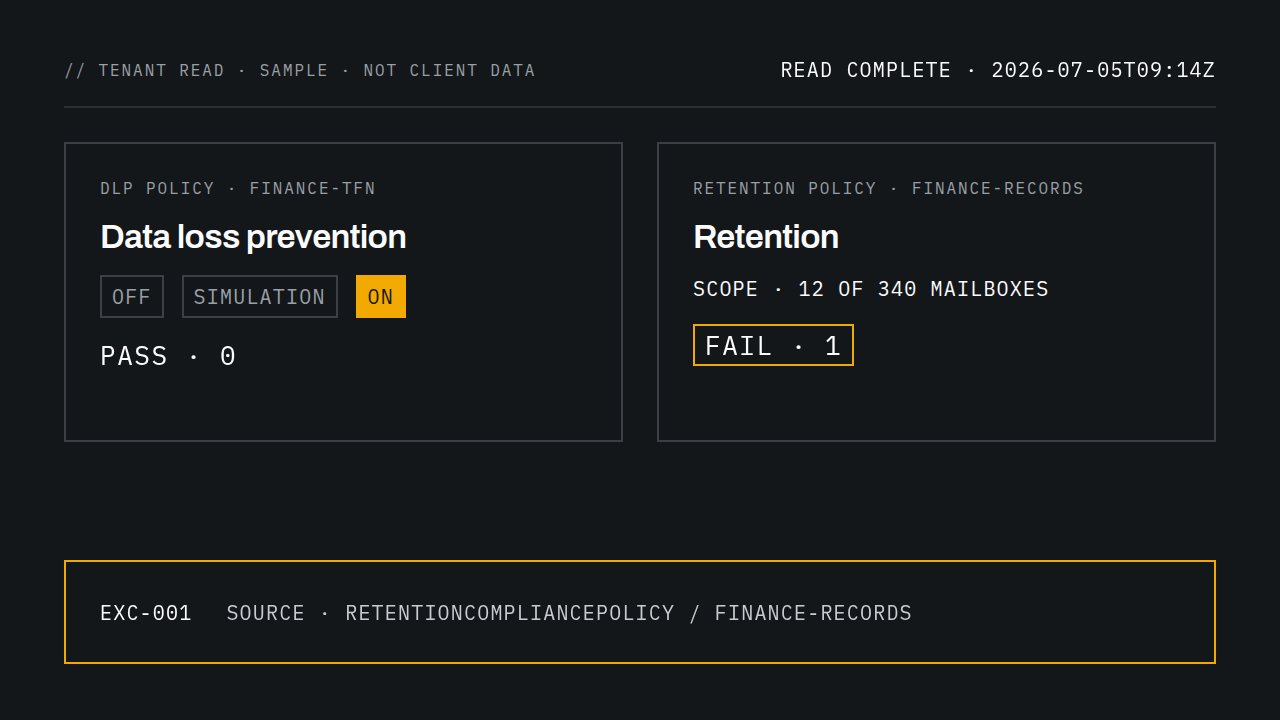
Sample tenant reading: a DLP policy moves from off to simulation to on and passes; a retention policy scoped to 12 of 340 mailboxes fails and its exception is logged.
A policy moves from simulation to enforcement, then the tenant is read. Sample data.

01 · The gap

Design documents describe intent. Tenants enforce configuration.

The two drift apart in ways the Purview portal does not flag on its own:

  • A DLP policy left in simulation mode. It reports every match and blocks nothing. Simulation is meant to run for up to 15 days before enforcement; many policies never leave it.
  • A retention policy on a static scope. It covers the mailboxes selected on the day it was created. New starters sit outside it until someone edits the policy. An adaptive scope re-runs its Entra ID query every day.
  • Auto-labelling that never left simulation. The label exists, the policy exists, and no document carries it.
  • Audit kept for 180 days. Audit (Standard) keeps 180 days. If an investigation needs twelve months, the records are already gone, and a longer retention policy set afterwards is not retroactive.

An auditor, APRA or AUSTRAC asks one question: is the control in place? The answer has to come from the tenant.

The design rail stays level while the tenant rail steps away at four points: simulation never enforced, static scope, auto-labelling with zero items, and 180-day audit. DESIGN TENANT SIMULATION · NEVER ENFORCED STATIC SCOPE · NEW STARTERS OUT AUTO-LABEL · 0 ITEMS AUDIT · 180 DAYS
Design documents stay level. The tenant drifts.

02 · Method

Map, read, configure, verify.

  1. Map

    Each sensitivity label, retention label and DLP policy is mapped to the requirement it is meant to satisfy, such as a record retention obligation or an endpoint data-handling rule.

  2. Read

    Control state is read directly from your tenant: policy configuration, DLP and labelling events in Activity explorer, label and sensitive information type counts in Data explorer, and the unified audit log. Design documents are not used as evidence.

  3. Configure

    Changes are built in your tenant, in production, alongside your team. New DLP and auto-labelling policies run in simulation first, then move to enforcement once the matches are reviewed.

  4. Verify

    Deployed state is read again and tested against each requirement. Every exception is listed individually, with the source record behind it.

03 · Evidence

What a tenant reading looks like.

Every control is read from your tenant and tested against the requirement it exists to meet. Exceptions are logged with their source record.

Sample reading · not client data

Read complete · 2026-07-05T09:14Z

  1. Sensitivity labels

    Requirement
    Confidential label on finance sites
    Deployed
    Published · all users
    Result
    PASS, 0 exceptions
  2. DLP · endpoint

    Requirement
    Block USB copy of TFN data
    Deployed
    Enforce mode · all devices
    Result
    PASS, 0 exceptions
  3. Retention · finance records

    Requirement
    Retain finance mailbox records under the retention schedule
    Deployed
    Scoped to pilot group only
    Result
    FAIL, 1 exception
Each control is read from the tenant, compared to its requirement, and every exception is logged with its source record.

04 · Scope

Microsoft Purview implementation across the suite.

Microsoft groups Purview into data security, data compliance and data governance, with protections for AI apps across all three. LensIQ implements each group and hands back the configuration, the rationale and the evidence.

Information protection and data loss prevention

Sensitivity labels. A label taxonomy your staff can apply, published by policy, with labels enabled for Office files in SharePoint and OneDrive. Auto-labelling policies run in simulation, are tuned against the results, then enforced.

Classifiers. Built-in sensitive information types such as Australian tax file numbers, custom types for your own identifiers, and Exact Data Match for client records, refreshed daily from a hashed reference table.

Data loss prevention. Policies for Exchange, SharePoint, OneDrive, Teams and endpoint devices. Each moves from simulation to Block with override, then to Block, with the simulation results kept as evidence.

Output Label taxonomy · publishing and auto-labelling policies · classifier definitions tested against sample files · DLP policy set with rule rationale

DLP policy states in order: off, simulation, block with override, block. Block is the enforced end state. OFF SIMULATION BLOCK WITH OVERRIDE BLOCK OFF SIMULATION BLOCK WITH OVERRIDE BLOCK

Retention, records, audit and eDiscovery

Retention and records. A file plan that maps each retention label to the obligation behind it. Labels declare records where the obligation requires it, with disposition review in up to five stages and proof of disposition at the end. Policies use adaptive scopes so new staff are covered on day one.

Audit. Audit (Premium) keeps a year of Exchange, SharePoint, OneDrive and Entra ID records for E5 users. Longer audit retention policies, up to 10 years with the add-on, only cover records created after they are set, so they are set before they are needed.

eDiscovery. Cases, custodians and holds configured so a legal or regulator request starts as a search, not a project.

Output File plan · retention label and policy set · disposition reviewers · audit retention policies · eDiscovery case template

Insider risk and communication compliance

Insider Risk Management. Data leaks and data theft by departing users policies, with the prerequisites each needs: a DLP policy for the first, the HR connector or the Entra ID account-deleted trigger for the second.

Communication Compliance. Policies across Exchange, Teams and Viva Engage. The financial regulatory compliance template includes a money laundering classifier.

Output Policies with named reviewers · prerequisite connectors configured · an alert triage procedure for those reviewers

Data governance: Data Map and Unified Catalog

Data sources registered and scanned into Data Map, then organised in Unified Catalog as governance domains with owners and data products. Both hold metadata only; no catalog role grants access to the data itself.

Output Registered and scanned sources · governance domains with named owners · first data products published

05 · Obligations

Mapped to the Australian obligation that applies to you.

Compliance Manager includes assessment templates for Australian regulation. LensIQ maps each configured control into the template that applies to you, and the assessment exports with implementation status, test date and result per control.

  • Privacy Act. Assessed against the Australia Privacy Act template. Personal information located with sensitive information types and Data explorer, labelled, and covered by DLP on email, files and devices.
  • APRA CPS 234. CPS 234 expects controls to be tested for effectiveness on a regular cycle. Each LensIQ re-read is that test: dated, per control, with the source record, assessed against the APRA CPS template.
  • AML/CTF (Tranche 2). Retention labels mapped to the record-keeping periods in your AML/CTF program, and communications reviewed with Communication Compliance's money laundering classifier. See AUSTRAC Tranche 2 obligations.
  • Essential Eight. Purview is not an Essential Eight control set. Where you report against it, Compliance Manager's ASD Essential 8 templates hold the evidence alongside your Purview assessment.
Privacy Act maps to sensitive information types, Data explorer, labels and DLP. APRA CPS 234 maps to dated re-reads. AML/CTF maps to retention labels and communication compliance. Essential Eight maps to template evidence. All of it lands in a Compliance Manager export. PRIVACY ACT APRA CPS 234 AML/CTF · TRANCHE 2 ESSENTIAL EIGHT SITs · DATA EXPLORER LABELS · DLP RE-READ · DATED RETENTION LABELS COMMS COMPLIANCE E8 TEMPLATE EVIDENCE COMPLIANCE MANAGER EXPORT · STATUS · TEST DATE
Each control lands in the Compliance Manager template that applies to you.

06 · Deliverables

What you keep.

  1. Configuration report: the deployed state of each control, timestamped at the time of reading.

  2. Exception register: each gap between requirement and deployment, with the affected scope and source record.

  3. Evidence index: a reference for every result, linked to its source record and its Compliance Manager control.

  4. Policy rationale: why each rule, scope and action was chosen, so the next administrator can change it safely.

  5. Configuration baseline: an export of every policy as deployed at handover, to compare against the next reading.

07 · Engagement

How an engagement runs.

  1. Before any access

    Scope

    We agree which Purview solutions and which obligations are in scope, and the access needed.

  2. Before any change

    Read

    LensIQ reads your tenant and returns the configuration report and exception register before any change.

  3. Simulation first

    Configure

    We build in production, simulation first, alongside your team.

  4. Handover

    Verify and hand over

    A second reading confirms each exception is closed. You keep the report, register, rationale and baseline.

08 · Audience

Who it is for.

Questions about Microsoft Purview implementation.

Which Purview areas are in scope?

Information Protection, Data Loss Prevention, Data Security Posture Management (which now includes what was DSPM for AI), Insider Risk Management, Communication Compliance, Data Lifecycle Management, Records Management, Audit, eDiscovery, Compliance Manager, Data Map and Unified Catalog. Scope is agreed at the first step, so an engagement can cover one of these or all of them.

What access do you need in our tenant?

Read-only access for the first reading: the Global Reader role in Microsoft Entra ID, plus the Purview role groups for the areas it does not reach, such as Insider Risk Management, Communication Compliance, eDiscovery, Data Security Posture Management and the Data Map. Configuration uses the Microsoft Purview role group for each solution in scope, for example Information Protection Admins, Records Management or eDiscovery Manager, granted for the engagement and removed at handover.

How long does it take?

It depends on how many Purview solutions are in scope. The first step agrees the scope and the order of work before any access is granted, and the first reading comes back before any change is made.

Do you use our design documents?

Only to understand the requirement. Every result comes from the deployed tenant state.

What happens after exceptions are found?

Each exception has a named owner and a fix. LensIQ can configure the fix and read again, or hand the register to your team or provider.

Know what your tenant enforces.

Request a configuration review. LensIQ reads your Purview configuration, compares each control to its obligation, and returns the exception register.

Request configuration review