Australian obligations, mapped to Microsoft Purview.
Purview labels, protects, keeps and finds data in Microsoft 365. None of its controls satisfies an obligation by being switched on. This page takes four Australian requirements of different kinds, a law, a regulator’s rules, a government policy and an ASD framework, says who each one binds, summarises what it asks for with a link to the source, and names the Purview controls that bear on it. Where Purview has no part to play, it says so.
Checked against sources ·
Four obligations, five Purview controls.
| Obligation | Sensitivity labels | Data loss prevention | Retention and records | Audit | eDiscovery |
|---|---|---|---|---|---|
| APP 11 · Privacy Act | Direct: Sensitivity labels for APP 11 · Privacy Act | Direct: Data loss prevention for APP 11 · Privacy Act | Direct: Retention and records for APP 11 · Privacy Act | Supports: Audit for APP 11 · Privacy Act | Supports: eDiscovery for APP 11 · Privacy Act |
| AML/CTF · record keeping | Not used | Not used | Direct: Retention and records for AML/CTF · record keeping | Supports: Audit for AML/CTF · record keeping | Direct: eDiscovery for AML/CTF · record keeping |
| PSPF · classification | Direct: Sensitivity labels for PSPF · classification | Direct: Data loss prevention for PSPF · classification | Supports: Retention and records for PSPF · classification | Not used | Not used |
| Essential Eight | Not used | Not used | Supports: Retention and records for Essential Eight | Not used | Not used |
- Direct
- the control does what the requirement describes.
- Supports
- it produces evidence for the requirement or covers part of it.
- Not used
- it has no part in this obligation.
Needs E5 or Purview Suite: automatic labelling, DLP in Teams chat and on devices, adaptive scopes, records and disposition review, and premium eDiscovery. Everything else this map names is available from Microsoft 365 E3.
This map is LensIQ’s reading of the sources listed at the end of the page. It is not legal advice.
APP 11: protect personal information, then destroy or de-identify it.
Applies toLaw. The Australian Privacy Principles in the Privacy Act 1988 bind the agencies and organisations the Act covers (APP entities).
- Sensitivity labels Direct
- Data loss prevention Direct
- Retention and records Direct
- Audit Supports
- eDiscovery Supports
What it requires
An organisation that holds personal information must take reasonable steps to protect it from misuse, interference and loss, and from unauthorised access, modification or disclosure (APP 11.1). Once the information is no longer needed for any permitted purpose, it must take reasonable steps to destroy or de-identify it (APP 11.2). OAIC, APP guidelines chapter 11
The OAIC’s guidelines name access security, ICT security, encryption and staff training among those steps. They do not name a product.
If a breach is suspected, the Notifiable Data Breaches scheme requires a reasonable and expeditious assessment of whether it is likely to cause serious harm, with all reasonable steps taken to finish it within 30 calendar days. OAIC, NDB scheme
Purview controls that bear on it
-
Sensitivity labels
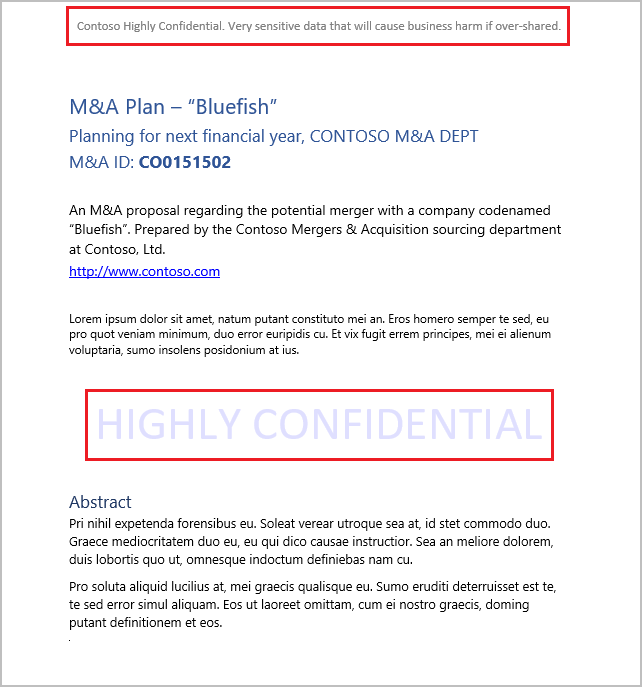
A label can encrypt documents, emails and meeting invites so only the people you name can open them, and mark them with a header, footer or watermark.
Licence · Manual labels in E3, E5 and Business Premium. Automatic labelling needs E5 or Purview Suite.
-
Data loss prevention
A DLP policy finds personal information as it is shared and can warn the sender with a policy tip or block the share. Built-in Australian types include the tax file number, driver’s licence, passport and bank account number.
Licence · Exchange, SharePoint and OneDrive in E3. Teams chat and devices need E5 or Purview Suite.
-
Retention and records
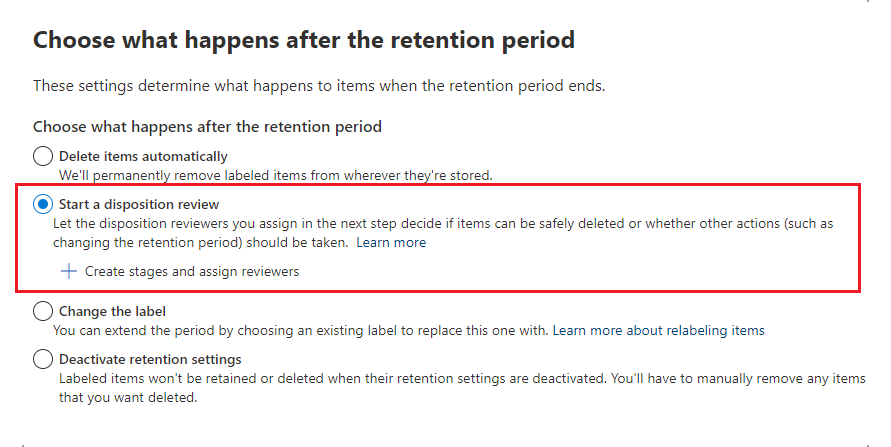
Retain-then-delete settings delete content when its period ends, which can carry out the destruction step of APP 11.2 for content in Microsoft 365. Disposition review puts each deletion in front of a named reviewer first. De-identification is not something they do.
Licence · Retention policies in E3. Disposition review needs E5 or Purview Suite.
-
Audit
Audit (Standard) records user and admin activity across Microsoft 365 and keeps it for 180 days, so a breach assessment can look back over what happened to the affected items.
Licence · Audit (Standard) in E3 and the Business plans.
-
eDiscovery
eDiscovery searches mailboxes, sites and Teams, so a breach assessment can find which items held the personal information.
Licence · Standard features in E3. Premium features need E5, Purview Suite or the eDiscovery and Audit add-on.
Where Purview stops
Purview acts on content in Microsoft 365, so personal information held in other systems is outside it. APP 11 also asks for governance and staff training, which no tenant setting provides, and no setting makes an organisation compliant on its own.
AML/CTF: keep the records, and keep them retrievable.
Applies toLaw. The AML/CTF Act 2006 and the AML/CTF Rules bind reporting entities, the businesses that provide designated services. The summary below is AUSTRAC’s guidance on them.
- Sensitivity labels Not used
- Data loss prevention Not used
- Retention and records Direct
- Audit Supports
- eDiscovery Direct
What it requires
Reporting entities must make and keep accurate and complete records. For most obligations the period is seven years, and for tranche 2 entities these obligations began on 1 July 2026. AUSTRAC, tranche 2 obligations factsheet
AUSTRAC’s checklist puts customer due diligence records at seven years from the end of the business relationship, and transaction records at seven years from the transaction. Records should be easy to retrieve and available for regulatory review or audit. AUSTRAC, record keeping checklist
Purview controls that bear on it
-
Retention labels
A retention label set to retain then delete keeps an item for the period you set and deletes it after. Inside Microsoft 365 the setting stays with the item when it moves, and if someone deletes the item early, a copy is kept in the Preservation Hold library or Recoverable Items.
Licence · Publishing labels for people to apply is in E3 and Business Premium. Applying them automatically needs E5 or Purview Suite.
-
Adaptive scopes
An adaptive scope re-runs its query every day, so a new starter’s mailbox falls under the policy without anyone editing it.
Licence · E5 or Purview Suite.
-
Records management
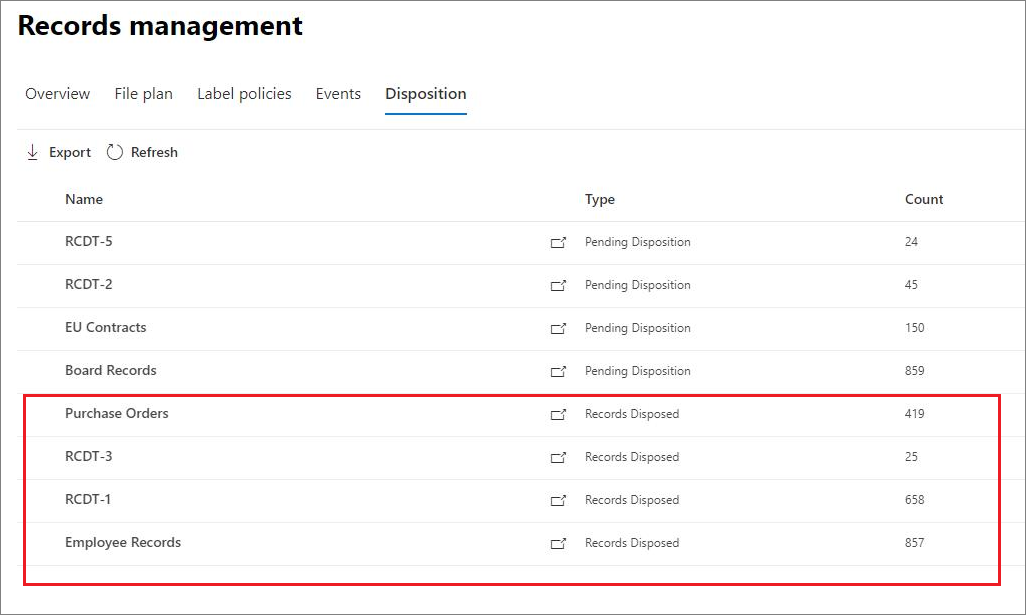
A retention label that marks an item as a record blocks its deletion. A regulatory record also blocks edits, and nobody, not even a global administrator, can remove its label; Microsoft hides that option until it is turned on in PowerShell. A retention label can also start a disposition review at the end of the period, so a named reviewer approves each deletion. When a record is deleted, records management keeps proof of disposition, drawn from the audit log.
Licence · E5 or Purview Suite.
-
eDiscovery
eDiscovery searches Exchange, SharePoint, OneDrive and Teams, places content on hold and exports it, which is how records are found and handed over for a regulatory review or audit.
Licence · Standard features in E3. Premium features need E5, Purview Suite or the eDiscovery and Audit add-on.
-
Audit
AUSTRAC asks for sensitive records to be stored securely with access limited to authorised staff. Audit records who accessed or changed items in Microsoft 365, which shows whether that limit holds.
Licence · Audit (Standard) in E3 and the Business plans.
Where Purview stops
Purview’s retention works on Microsoft 365 content. Records kept in a practice management, core banking or CRM system sit outside it, and the decision on what counts as a record is yours, not a setting’s.
PSPF: classify, mark and handle information at its level.
Applies toGovernment policy, not legislation. The PSPF sets requirements for Australian Government entities.
- Sensitivity labels Direct
- Data loss prevention Direct
- Retention and records Supports
- Audit Not used
- eDiscovery Not used
What it requires
The Protective Security Policy Framework sets out what Australian Government entities must do to safeguard their people, information and resources. Release 2024 replaced the previous 16 policies. Home Affairs, PSPF
Under Policy 8, routine information from business operations and services is OFFICIAL. Entities must apply the Australian Government Recordkeeping Metadata Standard to protectively mark information on systems that handle sensitive or security classified information, and must store, transfer and dispose of security classified information appropriately. PSPF Policy 8: Classification system
Purview controls that bear on it
-
Sensitivity labels
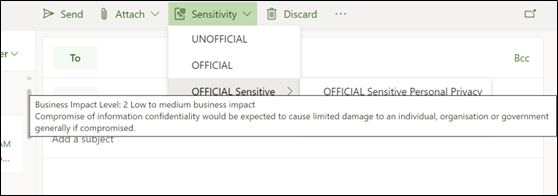
Microsoft’s guidance for the Australian Government, aligned to PSPF Release 2024, sets out one label per marking: UNOFFICIAL, OFFICIAL, OFFICIAL: Sensitive and PROTECTED, with information management markers such as Personal Privacy and Legal Privilege. ASD’s Blueprint for Secure Cloud has each label apply the marking as a header and footer.
Licence · Manual labels in E3, E5 and Business Premium.
-
Data loss prevention
An Exchange DLP policy adds the X-Protective-Marking header to outgoing email, and can append the marking to the subject line as a second method. In SharePoint and OneDrive, a DLP policy can block sharing PROTECTED items with people outside the organisation.
Licence · Exchange, SharePoint and OneDrive DLP in E3.
-
Retention and records
Retention and disposition carry the disposal part of handling, for Microsoft 365 content.
Licence · Retention policies in E3. Disposition review needs E5 or Purview Suite.
-
Ceiling
Microsoft’s guidance says Microsoft 365 can hold information up to PROTECTED. SECRET and above need a separate secure enclave.
Where Purview stops
Purview carries the marking and handling of information in Microsoft 365. Most of the PSPF sits outside any tenant setting.
Essential Eight: mostly outside Purview.
Applies toASD guidance, not legislation. Whether it binds you depends on whether a policy, contract or regulator requires it of you.
- Sensitivity labels Not used
- Data loss prevention Not used
- Retention and records Supports
- Audit Not used
- eDiscovery Not used
What it requires
ASD’s Essential Eight is eight mitigation strategies: patch applications, patch operating systems, multi-factor authentication, restrict administrative privileges, application control, restrict Microsoft Office macros, user application hardening and regular backups. ASD, Essential Eight
What Microsoft maps it to
-
Not Purview
Microsoft’s own Essential Eight guidance maps application control, patching and multi-factor authentication to Intune, Defender for Endpoint, Windows Autopatch and Entra Conditional Access, not to Purview.
-
Regular backups
For regular backups the same guidance names retention policies and labels alongside Azure Backup and Microsoft 365 Backup. It also says there are no separate backups in Microsoft 365: retained content is the same data, kept from deletion, so it supports the strategy rather than meeting it.
-
Compliance Manager
Purview Compliance Manager has Essential Eight assessment templates at all three maturity levels, for tracking progress against the strategies.
Licence · A premium template, licensed separately; some licence agreements include up to three premium templates.
Where Purview stops
If the Essential Eight is the obligation you answer to, the work is in Intune, Defender and Entra. A Purview project will not lift your maturity level on its own.
Where each statement comes from.
Australian Government
- OAIC Chapter 11: APP 11 Security of personal information Updated 3 October 2025
- OAIC Part 4: Notifiable Data Breach (NDB) Scheme Updated February 2025
- AUSTRAC AML/CTF obligations factsheet for tranche 2 reporting entities July 2025
- AUSTRAC Record keeping checklist (Reform) Read 9 October 2026
- Department of Home Affairs Protective Security Policy Framework Read 9 October 2026
- Department of Home Affairs PSPF Policy 8: Classification system Read 9 October 2026
- ASD Essential Eight, Blueprint for Secure Cloud Read 9 October 2026
- ASD Add PSPF X-header and subject marking, Blueprint for Secure Cloud Read 9 October 2026
Microsoft Learn
- Microsoft Learn about sensitivity labels Updated 15 April 2026
- Microsoft Learn about data loss prevention Updated 26 June 2026
- Microsoft Data loss prevention and Microsoft Teams Read 9 October 2026
- Microsoft Sensitive information type entity definitions Updated 15 June 2026
- Microsoft Learn about retention policies and retention labels Updated 22 July 2026
- Microsoft Adaptive scopes Updated 11 September 2026
- Microsoft Learn about records management Updated 26 September 2025
- Microsoft Disposition of content Updated 22 July 2026
- Microsoft Learn about auditing solutions in Microsoft Purview Updated 18 May 2026
- Microsoft Learn about eDiscovery Updated 29 June 2026
- Microsoft Sensitivity label taxonomy for the Australian Government Updated 24 June 2025
- Microsoft Sensitivity label configuration for the Australian Government Updated 25 August 2026
- Microsoft Preventing inappropriate distribution of security classified information for the Australian Government Updated 23 June 2025
- Microsoft Email marking strategies using Microsoft Purview for the Australian Government Updated 24 June 2025
- Microsoft ACSC Essential Eight, and its strategy articles Updated 24 March 2025 and 9 April 2026
- Microsoft Microsoft Purview service description Updated 3 August 2026
Microsoft Learn pages are named here rather than linked. The screenshots on this page are Microsoft’s, from the article named under each one, shown whole. Used with permission from Microsoft. Licence tiers are from the Microsoft Purview service description, updated 3 August 2026; Microsoft renames and repackages plans often, so check the current description before buying.
Check your tenant against the ones that apply to you.
A configuration review reads your tenant against the obligations that apply to you and lists each gap with the record behind it.